
Normal Photo Ko Cinematic & Premium Look Dene Wale Best AI Tools (2026 Guide)
Aaj ke digital time me photo sirf photo nahi rahi —
photo = impression, brand, confidence aur earning ka tool ban chuki hai.
Chahe aap:
- Instagram / Facebook creator ho
- Blogger ho
- Website owner ho
- Freelancer ho
- Ya sirf apni photos ko next-level banana chahte ho
ek baat clear hai normal photo ab kaam ki nahi lagti.
Par problem ye hai:
- DSLR sabke paas nahi
- Editing skills sabko nahi aati
- Photoshop seekhne me time lagta hai
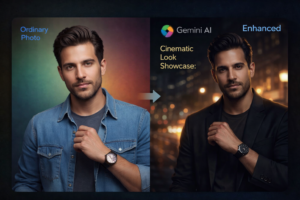
Yahin par AI Photo Enhancement Tools game change kar dete hain
Is article me aap jaanoge:
- Normal image ko cinematic & premium look kaise diya jata hai
- Kaun se best AI tools real me kaam karte hain
- Kis tool ka use kis purpose ke liye best hai
- Beginner se advanced tak ka clear roadmap
AI Photo Enhancement Kya Hoti Hai? (Simple Language Me)
AI photo enhancement ka matlab hai:
Artificial Intelligence ka use karke photo ki quality, lighting, sharpness, background, colors aur overall look ko automatically improve karna — bina manual editing ke.
AI tools:
- Face ko natural rakhte hain
- Skin ko plastic nahi banate
- Lighting ko cinematic feel dete hain
- Background ko professional look dete hain
Bas aap photo upload karo aur AI baaki ka kaam kar deta hai.
Cinematic & Premium Look Ka Matlab Kya Hai?
Cinematic look ka matlab sirf dark tone nahi hota.
Premium cinematic photo me hota hai:
- Balanced lighting (soft highlights + deep shadows)
- Natural skin texture
- Proper color grading
- Depth of field (background thoda blur)
- Professional camera feel
Jo photo dekhte hi bole:
“Yeh phone se nahi, professional shoot lag rahi hai”
Normal Photo Ko Pro Look Dene Me AI Tools Kyu Best Hain?
1. Time Saving
Manual editing me 1 photo = 30–60 minutes
AI tool me = 30 seconds
2. Beginner Friendly
No Photoshop
No layers
No curves
Bas upload → enhance
3. Cost Effective
Photographer + editor ka kharcha nahi
Free / low-cost tools available
4. Consistent Results
Har image me same premium quality maintain hoti hai
Best AI Tools for Cinematic & Premium Photo Enhancement
Ab aate hain real tools par jo actual me kaam karte hain
1. Gemini AI (Prompt + Image Based Enhancement)
Gemini AI ek powerful option hai jab aap:
- Apni image upload karna chahte ho
- Face bilkul same rakhna chahte ho
- Sirf background, lighting, outfit ya mood change karna chahte ho
Gemini AI kis ke liye best hai?
- Cinematic portraits
- Fashion & lifestyle photos
- Instagram reels thumbnails
- Blog featured images
Gemini ka real benefit:
- Prompt ke through exact control
- Face distortion ka risk kam
- Natural & premium output
2. Remini AI (Face & Quality Enhancement King)
Remini especially famous hai:
- Blur photos ko sharp karne ke liye
- Old photos ko enhance karne ke liye
- Face details improve karne ke liye
Best use case:
- Low quality photos
- Old mobile images
- WhatsApp DP improvement
Tip:
Zyada enhance mode use karoge to face thoda artificial lag sakta hai, isliye limit me use karein.
3. Leonardo AI (Cinematic Style Creation)
Leonardo AI un logon ke liye best hai jo:
- Creative cinematic looks chahte hain
- Fashion, fantasy ya luxury style banana chahte hain
Kya special hai?
- Advanced lighting styles
- High-end fashion vibe
- Editorial photography feel
4. Playground AI (Clean & Balanced Look)
Playground AI ka output:
- Clean
- Balanced
- Natural
Isliye ye best hai:
- Blog images
- Website banners
- Minimal premium photos
5. Adobe Firefly (Safe & Professional)
Adobe Firefly ka sabse bada plus:
- Commercial use safe
- Website & ads ke liye reliable
Best for:
- Background enhancement
- Color correction
- Professional branding visuals
Normal Photo Ko Cinematic Banane Ka Step-by-Step Process
Step 1: Sahi Photo Choose Karo
- Clear face
- Proper lighting
- Blur ya zoomed image avoid karo
Step 2: AI Tool Select Karo
- Face enhancement → Remini
- Cinematic prompt based → Gemini / Leonardo
Step 3: Prompt Me Ye Words Samjho (Likho Nahi)
- Natural lighting
- Cinematic depth
- Realistic skin texture
- Premium editorial look
Step 4: Over-editing Avoid Karo
- Zyada smooth skin = fake look
- Natural texture = premium look
AI Tools Se Kaun Log Fayda Utha Sakte Hain?
- Bloggers (featured images ke liye)
- Content creators
- Influencers
- Small business owners
- Freelancers
- Students
Basically jo bhi online dikhta hai, uske liye AI photo tools game-changer hain.
Common Mistakes Jo Log Karte Hain
- Har image pe same prompt
- Over-smooth skin
- Low resolution image upload
- Lighting ko ignore karna
Pro tip:
AI ko help karo achi input dekar, output khud improve ho jayega.
Future of AI Photo Enhancement
Aane wale time me:
- AI aur realistic hoga
- Manual editing almost unnecessary ho jayegi
- Personal branding aur strong hogi
Jo log aaj AI tools seekh rahe hain, woh kal sabse aage honge.
Conclusion
Aaj agar aap apni normal photos ko:
- Cinematic
- Premium
- Professional
banana chahte ho, to AI tools aapka sabse powerful shortcut hain.
Na mehenga camera chahiye
Na editing expert banna padega
Bas sahi tool, sahi approach aur thoda practice
aur aapki photos next-level ho jayengi
FAQs
Q1. Kya AI tools free me use ho sakte hain?
Haan, kaafi tools free version dete hain, premium features paid hote hain.
Q2. Kya AI face change kar deta hai?
Agar sahi prompt aur tool use karo to face same rehta hai.
Q3. Kya AI photos commercial use ke liye safe hain?
Adobe Firefly jaise tools commercial use ke liye safe hote hain.
Q4. Beginners ke liye kaunsa tool best hai?
Gemini AI aur Remini beginners ke liye easy hain.
Q5. Kya AI photos Instagram ke liye achi hoti hain?
Bilkul, cinematic AI photos Instagram pe zyada engagement laati hain.