Blurry AI Images Ko HD Kaise Kare (Complete Beginner to Pro Guide)
Introduction: AI Image Banayi… Par Blur Aa Gayi?
Aaj kal AI image tools ka craze bahut zyada hai. Log AI se portraits bana rahe hain, product photos create kar rahe hain, thumbnails bana rahe hain, blog images use kar rahe hain aur social media content bhi ready kar rahe hain. Lekin ek problem almost sabko face karni padti hai:
Image achhi banti hai… par blur hoti hai.
Kabhi face soft hota hai, kabhi details missing hoti hain, kabhi zoom karte hi image toot jati hai. Aur sach kahun to blurry image poori quality ko kharab kar deti hai.
Chahe prompt kitna bhi strong ho, agar image sharp nahi hai to:
- professional nahi lagti
- viewer impress nahi hota
- blog ka trust kam hota hai
- thumbnail weak lagta hai
- social media engagement bhi gir sakta hai
Good news ye hai ki blurry AI image ko HD banana possible hai.
Sirf ek click se nahi… lekin sahi process se definitely possible hai.
Is article me hum detail me samjhenge:
- AI images blur kyu hoti hain
- Blur image ko HD kaise kare
- Best tools aur settings kya hain
- Prompt level fixes kya hain
- Mobile users kya karein
- Future me blur image aane se kaise bachna hai
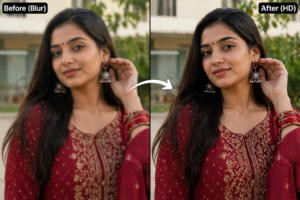
Agar aap AI content regularly use karte ho, ye guide aapke liye gold hai.
Part 1: Blur Problem Ko Samjho – Root Cause Kya Hai?
Sab Blur Same Nahi Hota
Bahut log sochte hain blur matlab bas image unclear hai. Lekin reality me blur ke types alag hote hain.
1. Soft Blur
Image overall smooth hoti hai, details missing hoti hain.
2. Low Resolution Blur
Zoom karte hi pixels tootne lagte hain.
3. Face Blur
Background sahi hota hai, face weak hota hai.
4. Motion Style Blur
AI kabhi cinematic blur de deta hai jo unnecessary hota hai.
Pehle Problem Identify Karo
Agar aap reason samajh gaye, to fix easy ho jata hai.
AI Images Blur Kyu Hoti Hain?
1. Weak Prompt
Agar prompt basic hai:
beautiful girl portrait
To AI details par focus nahi karega.
2. Low Generation Size
Kai tools default me small size image dete hain.
Example:
- 512×512
- 768×768
Ye zoom karne par blur lag sakti hai.
3. Too Much Beauty Effect
AI smooth skin aur dreamy effect de deta hai.
Result:
- soft face
- no sharp details
- fake output
4. Wrong Model / Tool
Har AI tool realistic HD output nahi deta.
5. Compression
Kabhi image save/download karte waqt quality lose hoti hai.
HD Image Ka Real Meaning
HD sirf size nahi hota.
Real HD image me hota hai:
- clear eyes
- face details
- skin texture
- clean edges
- balanced sharpness
- proper resolution
Sirf resolution badha dena enough nahi hota.
Golden Formula: Blur to HD
Strong Prompt + High Resolution + Upscale + Light Edit
Ye 4 pillars hain.
Prompt Se Blur Kaise Fix Kare
Prompt bahut powerful hota hai.
Agar aap ye words add karte ho:
- ultra detailed
- sharp focus
- high resolution
- crisp details
- DSLR quality
- realistic face details
- 8k image
- clear eyes
To result improve hota hai.
Weak Prompt Example
beautiful woman portrait
Strong Prompt Example
Indian woman portrait, sharp focus, ultra detailed face, realistic skin texture, DSLR quality, crisp eyes, high resolution, 8k
Difference
Second prompt much sharper output de sakta hai.
Face Blur Ko Kaise Fix Kare
Kai baar face blur aur body clear hoti hai.
Add These Words:
- detailed face
- sharp eyes
- clear facial features
- realistic skin pores
- high facial detail
Best Camera Terms Use Karo
AI camera language samajhta hai.
Use:
- DSLR photo
- 85mm lens
- RAW photo
- portrait photography
- professional focus
Ye image quality ko better direction dete hain.
Real Example
Agar aap AI model page chala rahe ho aur blurry face use karte ho:
trust kam hota hai
Lekin same face sharp HD ho:
premium lagta hai
Beginner Mistakes
Mistake 1: Prompt Short Rakhna
Mistake 2: Default Size Use Karna
Mistake 3: Same Result Accept Kar Lena
Mistake 4: Blur Image Ko Sharpen Overuse Karna
Correct Mindset
Image first try me perfect nahi aati.
Multiple generations normal hain.
Part 2: Best Upscaling Methods + Mobile Se HD Banane Ka Real Process
Ab tak aap samajh gaye ki blurry AI images aati kyu hain aur prompt level par unhe kaise improve kiya ja sakta hai. Ab hum us stage par aate hain jahan actual transformation hota hai:
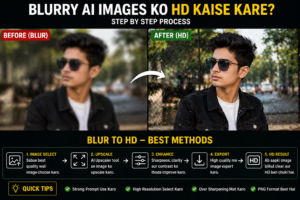
Blur image ko HD banana
Iske liye sabse powerful concept hai:
Upscaling
Agar aap AI content creator ho, blogger ho, thumbnail designer ho, ya Instagram creator ho — ye part bahut useful hai.
Upscaling Kya Hota Hai?
Simple language me:
Image ka size aur quality improve karna without poori image ko destroy kiye.
Normal resize aur upscale me difference hota hai.
Normal Resize:
- size bada hota hai
- pixels stretch hote hain
- blur aur badh sakta hai
AI Upscale:
- details improve hoti hain
- edges clean hoti hain
- sharpness better hoti hai
- image clearer lagti hai
Kab Upscale Karna Chahiye?
Agar image:
- 512px ya 768px hai
- zoom me blur lagti hai
- blog featured image banani hai
- thumbnail use karni hai
- print karni hai
To upscale zaroor karo.
Best Free Ways to Upscale AI Images
1. Built-in AI Tool Upscale Option
Kai AI generators ke andar upscale button hota hai.
Use zaroor karo kyunki:
- same image improve hoti hai
- face preserve hota hai
- quality naturally enhance hoti hai
2. Dedicated Upscaler Tools
Ye tools specially image enhance karte hain.
Best for:
- face sharpen
- background clean
- size increase
3. Mobile Editing Apps
Agar laptop nahi hai, mobile se bhi kaam ho sakta hai.
Apps me:
- sharpen
- clarity
- detail enhance
- upscale options mil sakte hain
Mobile Se Blur AI Image Ko HD Kaise Kare
Bahut users sirf mobile use karte hain. Good news:
Kaafi kuch mobile se possible hai.
Step-by-Step Mobile Workflow
Step 1: Best Original Save Karo
Jo image least blur ho, wahi choose karo.
Step 2: AI Upscale Karo
Image ko upscale tool me daalo.
Step 3: Light Editing Karo
Adjust:
- sharpness slight
- contrast low
- texture mild
- brightness balanced
Step 4: Export Highest Quality
Always high quality export choose karo.
Real Example
Suppose aapne AI se ek female portrait banaya.
Problem:
- eyes soft hain
- face smooth hai
- zoom me blur
Fix:
- Upscale
- Eyes sharpen slight
- Texture add
- Export HD
Final image premium lag sakti hai.
Face Detail Improve Karne Ka Formula
Kai log poori image sharpen kar dete hain. Ye galti hai.
Focus Karo:
- eyes
- lips edges
- eyebrows
- hairline
Ye areas improve hote hi image sharper feel hoti hai.
Sharpening Me Overuse Mat Karo
Too Much Sharpen = Bad Result
- noisy image
- weird skin
- fake details
Controlled Sharpen
Natural clarity better hoti hai.
Best Prompt + Upscale Combo
Generate karte waqt hi quality improve karo.
Prompt Example:
Indian man portrait, sharp focus, ultra detailed face, DSLR quality, crisp eyes, realistic skin texture
Then upscale.
Ye combo strongest hota hai.
Low Quality Background Kaise Fix Kare
Kabhi face sahi hota hai, background weak.
Solution:
- blur background naturally
- depth increase
- simple crop
Viewer face par focus karega.
Bloggers Ke Liye Important Tip
Agar aap featured image use kar rahe ho:
Minimum Quality:
- clear title text
- sharp subject
- no muddy blur
- proper dimensions
Blur featured image CTR kam kar sakti hai.
Content Creators Ke Liye Tip
Agar Instagram page hai:
- blurry face = low retention
- clean face = more pause rate
People clear images par rukte hain.
Beginner Mistakes in HD Fixing
Mistake 1: Tiny Image Ko Direct Use Karna
Mistake 2: 100 Sharpen Kar Dena
Mistake 3: Screenshot Save Karna
Mistake 4: Low Quality Re-upload
Golden Export Rule
Final save:
- PNG if possible
- highest quality JPG
- no multiple compressions
Quick HD Rescue Method (Fast)
Agar time kam hai:
- Best image choose karo
- Upscale karo
- Sharpness +10
- Contrast +5
- Export high quality
Part 3: Advanced Pro Methods + FAQs + Final Expert Guide
Ab tak aap blur problem ka reason samajh gaye, prompt improve karna seekh liya aur upscale workflow bhi jaan liya. Ab final part me hum baat karenge pro-level methods ki, jisse aap future me blurry AI images se bach sakte ho aur har baar better HD output le sakte ho.
Yahi wo stage hai jahan beginner random results leta hai aur smart creator consistent quality banata hai.
Future Me Blur Image Aane Se Kaise Bachein
Sabse best fix kya hai?
Blur image ko repair karna nahi… blur image aane hi mat do.
1. Starting Resolution High Rakho
Agar tool allow karta hai to higher size choose karo:
- 1024×1024
- 1536px
- wide HD formats
Small image se problem start hoti hai.
2. Prompt Me Sharpness Mention Karo
Use words:
- sharp focus
- crisp details
- ultra detailed
- high resolution
- DSLR quality
3. Multiple Variations Generate Karo
Ek image weak aa sakti hai.
4 variations me usually ek strong result milta hai.
4. Realistic Style Choose Karo
Cartoon ya dreamy styles kabhi soft output dete hain.
Agar HD realism chahiye to realistic photography style use karo.
Pro Workflow – Har Baar Better Output
Step 1:
Strong prompt likho.
Step 2:
Best variation choose karo.
Step 3:
Upscale karo.
Step 4:
Minor edit karo.
Step 5:
Correct export quality me save karo.
Thumbnail Creators Ke Liye HD Formula
Agar YouTube thumbnail banani hai:
- face clear ho
- eyes sharp ho
- text readable ho
- background clean ho
Blur thumbnail ignore ho sakti hai.
Bloggers Ke Liye HD Formula
Featured image me:
- clean subject
- no muddy blur
- proper contrast
readable text overlay
Ye CTR improve kar sakta hai.
Instagram Creators Ke Liye HD Formula
- face center me
- clean skin texture
- crisp eyes
- vertical crop
People mobile screen par face pehle dekhte hain.
Real Example
Suppose aapne AI se male business portrait banaya.
Weak Version:
- soft jawline
- blur hair
- dull eyes
Fixed Version:
- upscale
- eye clarity
- contrast improve
- texture mild
Final result LinkedIn level lag sakta hai.
Pros & Cons of HD Fixing AI Images
Pros
- image premium lagti hai
- social media engagement better ho sakta hai
- blog quality improve hoti hai
- text overlays sharper lagte hain
- brand trust badhta hai
Cons
- over editing se fake look aa sakta hai
- low original image fully recover nahi hoti
- kuch tools paid hote hain
- time lag sakta hai perfect result me
FAQs (Most Asked Questions)
Q1: Blur AI image ko 100% original sharp banaya ja sakta hai?
Depends on original quality. Mild blur fix ho sakta hai, extreme blur limited improve hota hai.
Q2: Best fix prompt hai ya upscale?
Dono. Strong prompt + upscale best combo hai.
Q3: Mobile se HD possible hai?
Haan, agar proper upscale aur light editing karo.
Q4: Sharpen kitna use karein?
Low to medium. Overuse avoid karo.
Q5: JPG ya PNG better hai?
PNG usually cleaner hota hai. High quality JPG bhi good hai.
Q6: Kya screenshot lena sahi hai?
Nahi. Direct download quality better hoti hai.
Q7: Free tools enough hain?
Basic level ke liye haan. Advanced creators premium tools use karte hain.
Common Mistakes Final Reminder
Avoid:
- tiny image use karna
- over sharpen
- repeated compressions
- weak prompt
- low export quality
- first result accept kar lena
30 Second HD Cheat Sheet
Generate Prompt:
Indian woman portrait, sharp focus, crisp eyes, ultra detailed face, realistic skin texture, DSLR quality, high resolution
Then:
- Upscale
- Slight sharpen
- Export HD
Powerful Conclusion
Sach ye hai ki blurry AI image ka problem common hai, lekin permanent nahi. Aksar issue AI tool nahi hota, process hota hai.
Jab aap:
- better prompt likhte ho
- sahi resolution choose karte ho
- upscale karte ho
- over edit nahi karte
To average image bhi premium ban sakti hai.
Aaj ke time me jo creator image quality samajh gaya, uska content naturally better dikhega.
Final Golden Line
Blur image chance se aati hai, HD image process se banti hai.