
Realistic Skin Texture AI Me Kaise Banaye (Complete Beginner to Pro Guide)
Introduction: AI Face Real Lagta Hai, Skin Fake Kyu Lagti Hai?
Aaj kal AI images ka trend bahut fast grow kar raha hai. Log AI se models bana rahe hain, portraits create kar rahe hain, social media content bana rahe hain aur kuch log to AI influencer pages bhi chala rahe hain. Lekin ek common problem sabko face karni padti hai:
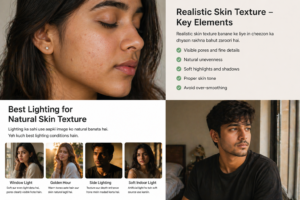
Face to acha ban jata hai, lekin skin plastic jaisi lagti hai.
Kabhi skin bahut smooth hoti hai, kabhi wax doll jaisi, kabhi unreal shine hoti hai. Dekhne me instantly samajh aa jata hai ki image AI generated hai.
Sach bataun to realistic AI image ka sabse bada secret face shape nahi, skin texture hota hai.
Agar skin natural lage:
- image premium lagti hai
- realistic feel aata hai
- viewer trust karta hai
- Instagram ya blog par quality better dikhti hai
Aur agar skin fake lage:
- poori image weak ho jati hai
- expensive lighting bhi kaam nahi karti
- face lifeless lagta hai
Is guide me hum detail me samjhenge ki AI me realistic skin texture kaise banaye, beginners kya mistakes karte hain, kaunse prompts use kare, aur final output ko DSLR jaisa kaise dikhaye.
Part 1: Foundation Samjho – Realistic Skin Texture Hota Kya Hai?
Skin Texture Ka Meaning
Bahut log sochte hain texture matlab daag-dhabbe ya rough skin. Nahi.
Realistic skin texture ka matlab hai:
- natural pores visible ho
- slight lines ho
- soft unevenness ho
- over smooth na ho
- natural highlights ho
- skin me depth ho
Human skin kabhi perfectly smooth nahi hoti. Agar AI image me bilkul butter smooth skin hai, to wo fake lagegi.
Real Life Example
Socho aapne ek mobile selfie li natural sunlight me.
Aap zoom karoge to dikhega:
- nose area par pores
- cheeks par subtle grain
- forehead par light reflection
- lips ke paas fine lines
Yahi natural details AI image me missing hoti hain. Isi liye output fake lagta hai.
AI Skin Fake Kyu Lagti Hai?
1. Over Beauty Filter Style Output
Kai AI tools default me skin smooth kar dete hain. Ye selfie filter jaisa effect dete hain.
Result:
- doll look
- no pores
- unrealistic glow
2. Prompt Me Texture Mention Nahi Karna
Agar aap sirf likhte ho:
beautiful girl portrait realistic
To AI focus karega face aur beauty par, texture par nahi.
3. Wrong Lighting
Harsh lighting ya flat lighting se skin details gayab ho jati hain.
4. Excess Editing
Image generate hone ke baad log aur smooth kar dete hain.
Realistic Skin Texture Banane Ka Golden Rule
Beauty kam, realism zyada demand karo
Agar prompt me sirf beauty words bhar doge:
- flawless
- perfect skin
- ultra smooth
- glowing skin
To AI natural skin destroy kar dega.
Prompt Me Ye Words Add Karo
Aapko texture ke liye realistic keywords use karne honge.
Best Keywords:
- realistic skin texture
- natural skin pores
- visible pores
- subtle imperfections
- fine facial details
- natural skin grain
- detailed facial texture
- authentic skin surface
- natural human skin
Example Prompt
young Indian woman portrait, soft daylight, realistic skin texture, visible pores, subtle facial details, DSLR photo, natural skin tone, cinematic realism
Ye prompt much better result dega compared to:
beautiful girl HD portrait
Lighting Ka Sabse Bada Role
Prompt acha ho sakta hai, lekin lighting galat hui to skin flat lag sakti hai.
Best Lighting for Skin Texture
1. Soft Window Light
Sabse natural.
- face par smooth highlights
- pores visible
- natural shadow
2. Golden Hour Light
Evening sunlight skin ko premium banati hai.
3. Side Lighting
Texture show karti hai because shadow depth create hoti hai.
Avoid Karo
- flat studio white light
- overexposed front flash
- too dark lighting
Camera Terms Add Karna Kyu Zaroori Hai
AI camera language samajhta hai. Agar aap ye words use karte ho:
- DSLR photo
- 85mm lens
- shallow depth of field
- high detail portrait
- RAW photo style
To image quality improve hoti hai aur skin texture bhi realistic aata hai.
Example Upgrade Prompt
Indian male portrait, natural beard, realistic skin texture, visible pores, DSLR photo, 85mm lens, soft side lighting, high detail face
Beginners Ki Sabse Badi Mistakes
Mistake 1: Ultra Smooth Skin Demand Karna
Prompt:
flawless skin, smooth skin, perfect face
Result fake.
Mistake 2: Too Many Filters
Prompt:
glam beauty cinematic glossy smooth radiant
Confusing output.
Mistake 3: Texture Without Light
Texture likh diya, light nahi likhi.
Mistake 4: Wrong Ethnicity Tone
Natural skin tone mention nahi kiya to AI random output deta hai.
Quick Fix Formula
Use This Structure:
Subject + Skin Details + Lighting + Camera + Quality
Example:
25 year old Indian woman, wheatish skin tone, realistic skin texture, visible pores, soft window light, DSLR portrait, 8k detailed face
Part 2: Realistic Skin Texture Ke Advanced Methods + Ready Prompts
Ab tak aap samajh chuke ho ki realistic skin texture ka base kya hai. Ab hum next level par jayenge — jahan beginners ruk jaate hain aur creators grow karte hain
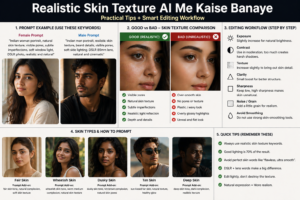
Is part me hum baat karenge:
- Male aur female ke liye realistic prompts
- Different skin tones kaise generate kare
- Editing ke baad texture kaise bachaye
- Ready-made prompt templates
- Pro secrets jo result ko next level le jaate hain
Male AI Face Me Realistic Skin Texture Kaise Banaye
Kai log notice karte hain ki male portraits me skin ya to over smooth aati hai ya bahut harsh.
Reason simple hai:
Prompt balance sahi nahi hota.
Best Male Skin Texture Prompt Example
handsome Indian man portrait, natural beard texture, realistic skin pores, masculine facial details, soft side lighting, DSLR 85mm lens, high detail realistic skin texture
Why This Works
Isme humne add kiya:
- beard texture
- masculine details
- realistic pores
- side light
Ye male face ko stronger aur natural banata hai.
Female AI Face Me Realistic Skin Texture Kaise Banaye
Female prompts me beginners sabse zyada galti karte hain.
Woh likhte hain:
- flawless skin
- perfect beauty
- ultra smooth face
Result:
plastic doll look
Best Female Prompt Example
beautiful Indian woman portrait, natural skin tone, realistic skin texture, subtle pores, soft cheeks texture, natural makeup look, warm daylight, DSLR portrait
Why This Works
Yahan beauty bhi hai aur realism bhi.
Different Skin Tones Kaise Banaye
AI me natural skin tone mention karna bahut zaroori hai. Nahi to random fair skin ya unrealistic tone aa sakta hai.
Popular Skin Tone Terms
Fair Tone
- light natural skin tone
- soft fair complexion
Wheatish Tone
- wheatish Indian skin tone
- warm medium complexion
Dusky Tone
- rich dusky skin tone
- deep warm brown skin tone
Tan Tone
- sun kissed tan skin tone
Example Prompt (Wheatish Indian Tone)
Indian woman portrait, wheatish skin tone, realistic pores, natural skin texture, warm daylight, cinematic DSLR photo
Editing Ke Baad Skin Texture Kaise Preserve Kare
Ye sabse underrated topic hai.
Kai log perfect AI image generate karte hain, phir editing app me jaakar texture destroy kar dete hain.
Avoid These Editing Mistakes
Too Much Smooth Tool
Instant fake look.
Too Much Brightness
Texture wash out ho jata hai.
Too Much Contrast
Skin harsh lagti hai.
Face Sharpen Overuse
Artificial details create hote hain.
Correct Editing Method
Slight Adjustments Karo
- brightness +5 to +10
- contrast +5
- texture slight increase
- clarity controlled
Grain Add Karna
Kabhi-kabhi subtle grain se image real lagti hai.
Ready-to-Use Prompt Templates
1. Female Indoor Portrait
Indian woman portrait, wheatish skin tone, realistic skin texture, visible pores, soft indoor window light, natural makeup, DSLR photo
2. Male Outdoor Portrait
Indian man portrait, realistic skin texture, beard details, natural pores, golden hour sunlight, cinematic DSLR photo
3. Luxury Model Style
fashion model portrait, realistic skin texture, subtle imperfections, premium studio light, DSLR 85mm lens, ultra realistic
4. Closeup Face Prompt
closeup human face, realistic skin pores, natural lips texture, eye details, soft side lighting, RAW DSLR realism
Secret Prompt Words Jo Difference Banate Hain
Ye words creators use karte hain:
- skin pores
- subtle imperfections
- natural skin grain
- authentic face details
- human realism
- DSLR raw portrait
- detailed skin surface
Comparison: Wrong vs Right Prompt
Wrong Prompt
beautiful girl smooth skin perfect face HD
Result:
- fake beauty filter look
Right Prompt
Indian woman portrait, realistic skin texture, visible pores, natural skin tone, soft daylight, DSLR photo
Result:
- premium realistic image
Real Life Example
Socho aap AI influencer page chala rahe ho.
Agar har image me plastic skin hogi:
log samajh jayenge fake page hai
Agar subtle natural texture hoga:
- trust badhega
- followers rukenge
- engagement improve hogi
Texture + Expression Combo
Sirf skin texture enough nahi hota.
Natural expression bhi important hai:
- slight smile
- candid face
- relaxed eyes
Ye realism ko double kar deta hai.
Pro Workflow (Simple)
- Strong prompt likho
- 4 versions generate karo
- Best face choose karo
- Slight edit karo
- Over smooth mat karo
Part 3: Full Expert Workflow + FAQs + Final Secrets (Complete Guide)
Ab tak aapne basics aur advanced methods dono samajh liye. Ab final part me hum baat karenge us practical system ki jo aapko har baar better realistic skin texture results dene me help karega.
Yahi wo stage hai jahan beginner random output se bahar aata hai aur creator controlled results lene lagta hai.
Full Expert Workflow – Har Baar Realistic Skin Texture Kaise Laye
Step 1: Subject Clearly Define Karo
Prompt me sirf “girl portrait” mat likho.
Instead:
- age
- nationality
- skin tone
- gender
- expression
Mention karo.
Example:
25 year old Indian woman, wheatish skin tone, calm expression
Step 2: Texture Keywords Add Karo
Ye core part hai.
Add terms like:
- realistic skin texture
- visible pores
- subtle imperfections
- natural skin grain
Step 3: Lighting Add Karo
Lighting ke bina skin flat lag sakti hai.
Best Options:
- soft window light
- golden hour sunlight
- side lighting
- cinematic indoor lamp light
Step 4: Camera Terms Add Karo
Use:
- DSLR photo
- 85mm lens
- RAW portrait
- shallow depth of field
Step 5: Generate Multiple Versions
Ek hi result par depend mat karo.
3–5 versions banao aur best choose karo.
Step 6: Light Editing
Only minor corrections:
- brightness
- contrast
- sharpness
- grain
Ultimate Prompt Formula
Use This:
Subject + Skin Tone + Texture + Lighting + Camera + Quality
Example:
Indian male portrait, medium wheatish skin tone, realistic skin texture, visible pores, soft side lighting, DSLR 85mm lens, ultra detailed realistic photo
Realistic Skin Texture Ke Liye Best Scenes
1. Window Portrait
Natural and premium.
2. Coffee Shop Look
Warm tones + human vibe.
3. Balcony Morning Shot
Fresh realistic feel.
4. Rainy Window Mood Shot
Soft emotional realism.
5. Bedroom Candid Portrait
Very human and relatable.
Advanced Tips Jo Experts Use Karte Hain
Tip 1: Slight Imperfections Allow Karo
Perfect face fake lagta hai.
Thoda uneven texture = realistic.
Tip 2: Face Over Sharp Mat Karo
Too much sharpness pores ko weird bana deti hai.
Tip 3: Matte Skin Better Lagti Hai
Over shiny skin fake lag sakti hai.
Tip 4: Expression Natural Rakho
Natural eyes + realistic skin = strong result.
Tip 5: Background Bhi Realistic Ho
Agar skin real aur background cartoon hai to image weak lagti hai.
Pros & Cons of Realistic Skin Texture AI Images
Pros
- image real lagti hai
- viewer trust karta hai
- premium quality feel
- social media engagement better ho sakta hai
- AI detection kam obvious hoti hai
Cons
- prompting me time lagta hai
- wrong edit se texture destroy ho sakta hai
- some tools over smooth kar dete hain
- perfect result ke liye practice chahiye
FAQs (Most Asked Questions)
Q1: AI image me pores kaise laye?
Prompt me add karo:
visible pores, realistic skin texture
Q2: Smooth skin aur realistic skin me difference?
Smooth skin filter jaisi lagti hai.
Realistic skin me natural texture hota hai.
Q3: Kya mobile se editing karke realistic bana sakte hain?
Haan, bas over smoothing avoid karo.
Q4: Male portraits ke liye kya add kare?
Beard texture, jawline details, masculine skin texture.
Q5: Female portraits me fake look kaise avoid kare?
Perfect skin words avoid karo. Natural makeup look use karo.
Q6: Best lighting kaunsi hai?
Soft daylight aur golden hour.
Q7: Kya every tool same output deta hai?
Nahi. Har AI tool ka rendering style alag hota hai.
Common Mistakes Final Reminder
Avoid:
- flawless skin
- ultra smooth face
- over sharpen
- too much glow
- no lighting mention
- no camera detail
- random prompts
30 Second Quick Prompt Cheat Sheet
Female:
Indian woman portrait, wheatish skin tone, realistic skin texture, visible pores, soft daylight, DSLR photo
Male:
Indian man portrait, beard details, realistic skin texture, natural pores, cinematic side light, DSLR 85mm lens
Powerful Conclusion
Sach ye hai ki AI image realistic tab lagti hai jab skin realistic lage. Eyes, hair aur clothes important hain, lekin viewer sabse pehle face feel karta hai.
Agar skin plastic hai, image fake lagegi.
Agar skin natural hai, thodi imperfections hain, lighting sahi hai — to viewer rukega aur image ko real samjhega.
Isliye next time jab bhi AI portrait banao, beauty ke piche mat bhaago. Realism ke piche jao.
Final Golden Line
Perfect skin fake lagti hai, natural skin trust build karti hai.