AI Face Distortion Fix Karne Ke 7 Tarike (Complete Beginner to Pro Guide)
Introduction: AI Face Bana… Par Chehra Bigad Gaya?
Aaj ke time me AI image generation ka craze full speed me chal raha hai. Log portraits bana rahe hain, influencer photos create kar rahe hain, profile pictures design kar rahe hain aur blogging ke liye custom images use kar rahe hain. Lekin ek common problem har dusra user face karta hai:
Face distortion
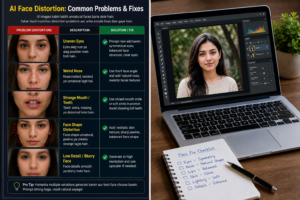
Kabhi aankh tedhi hoti hai, kabhi lips ajeeb lagte hain, kabhi fingers ki tarah face features mix ho jaate hain. Kabhi ek eye badi aur ek choti. Kabhi nose melt jaisi. Aur kabhi poora face hi unnatural lagta hai.
Sach kahun to AI image me sabse zyada notice hone wali cheez face hi hoti hai. Agar face sahi nahi hai, poori image weak lagti hai.
Good news ye hai:
Face distortion fix ho sakta hai.
Aur kai baar generate karte waqt hi avoid bhi kiya ja sakta hai.
Is article me hum detail me samjhenge:
- AI face distortion hota kyu hai
- Face bigadne ke real reasons
- 7 powerful fix methods
- Prompt tricks
- Editing methods
- Future me distortion avoid kaise kare
Agar aap realistic AI portraits banana chahte ho, ye guide bahut useful hai.
Part 1: Problem Samjho – AI Face Distortion Hota Kya Hai?
Face Distortion Ka Meaning
Simple language me:
Jab AI generated image me face natural proportions lose kar deta hai.
Example:
- uneven eyes
- broken smile
- weird teeth
- twisted jaw
- melted nose
- duplicate features
- blurred facial structure
Real Example
Socho aapne ek professional portrait banaya.
Sab sahi hai:
- lighting
- background
- clothes
Lekin aankh ek side shift hai.
Viewer instantly notice karega.
Yahi face distortion ka problem hai.
AI Face Distortion Kyu Hota Hai?
1. Weak Prompt
Agar prompt vague hai:
beautiful person portrait
To AI confused ho sakta hai.
2. Too Complex Scene
Agar prompt me:
- side angle
- sunglasses
- smile
- crowd
- motion
- low light
Sab ek saath hai to face error aa sakta hai.
3. Low Resolution Generation
Small size images me face details toot sakti hain.
4. Poor Model Understanding
Har AI tool faces equally strong generate nahi karta.
5. Too Many Filters
Beauty + cinematic + fantasy + ultra glow + dramatic angle
distortion chance badh jata hai.
Golden Truth
Jitna zyada face close-up hoga, utni perfection zaroori hogi.
7 Tariko Me Se Pehla Tarika – Strong Prompt Use Karo
Sabse pehla fix prompt se start hota hai.
Use Keywords:
- symmetrical face
- realistic facial features
- natural eyes
- balanced face structure
- detailed portrait
- clear facial anatomy
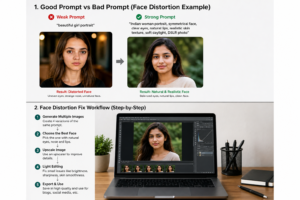
Weak Prompt:
beautiful girl portrait
Better Prompt:
Indian woman portrait, symmetrical face, realistic facial features, clear eyes, balanced face structure, DSLR photo
Tarika 2 – Front Face Angle Use Karo
Beginners side angle aur dramatic poses use karte hain.
Start karo:
front facing portrait
slight side turn
eye level camera
Ye distortion kam karta hai.
Tarika 3 – Simple Background Rakho
Busy background se AI face par focus lose karta hai.
Use:
- studio background
- blurred room
- outdoor soft bokeh
Tarika 4 – Face Detail Words Add Karo
Prompt me add karo:
- detailed eyes
- natural lips
- realistic nose
- sharp jawline
- high facial detail
Real Example Prompt
Indian male portrait, realistic eyes, sharp jawline, natural lips, balanced nose, symmetrical face, soft daylight, DSLR quality
Beginner Mistakes
Sirf “beautiful face” likhna
Fantasy words overload karna
Extreme side angle lena
Tiny image size generate karna
Part 2: Remaining Fixes + Editing Se Face Distortion Repair Kaise Kare
Ab tak aap samajh gaye ki AI face distortion hota kyu hai aur prompt level par usse kaise control kiya ja sakta hai. Ab hum next level par aate hain:
Jab image ban chuki ho aur face thoda bigda ho, tab kya karein?
Is part me hum baat karenge baaki powerful methods aur repair workflow ki.
Tarika 5 – High Resolution Generate Karo
Kai baar distortion ka reason sirf low quality hota hai.
Agar image small size me generate hui hai:
- eyes soft ho sakti hain
- lips mix ho sakte hain
- nose unclear ho sakti hai
Better Sizes Use Karo
- 1024×1024
- 1152px+
- wide HD portrait sizes
Jitni better resolution, utna clean face structure.
Tarika 6 – Multiple Variations Generate Karo
Ye pro trick hai.
Ek image weak aa sakti hai. Dusri same prompt se amazing aa sakti hai.
Rule:
Same prompt se 4 versions generate karo.
Phir choose karo:
- best eyes
- best smile
- best symmetry
- clean skin details
Tarika 7 – Face Repair / Light Editing Use Karo
Agar image almost perfect hai aur sirf minor issue hai, to editing help karti hai.
Kya Improve Kar Sakte Ho:
- eye alignment feel better
- sharpen eyes
- lips edges clean
- skin cleanup
- crop improve
Over Edit Mat Karo
Too much retouch = fake result.
Face Distortion Repair Workflow (Simple)
Step 1:
Best generated version choose karo.
Step 2:
Zoom karke face inspect karo.
Check:
- eyes same size?
- nose center me?
- smile natural?
- ears normal?
Step 3:
Minor edit karo.
Step 4:
Export HD.
Eyes Distortion Fix
Sabse common issue eyes hote hain.
Prompt Me Add Karo:
- symmetrical eyes
- clear eyes
- detailed eyes
- natural gaze
Editing Tip:
Slight sharpen around eyes.
Smile / Teeth Distortion Fix
AI kabhi weird teeth bana deta hai.
Better Prompt:
- closed mouth smile
- soft smile
- natural smile
Ye full teeth errors avoid karta hai.
Nose Distortion Fix
Agar side angle me nose weird aa rahi hai:
Use:
- front portrait
- slight side angle
- balanced face structure
Jawline Distortion Fix
Prompt:
- sharp jawline
- natural jawline
- masculine jaw structure
Real Example
Suppose image me:
- left eye thodi odd
- lips okay
- hair good
- background perfect
Kya karo?
Regenerate same prompt with higher resolution.
Kai baar second attempt me fix mil jata hai.
Prompt Upgrade Formula
Weak Prompt:
beautiful man portrait
Strong Prompt:
Indian man portrait, symmetrical face, clear eyes, realistic facial anatomy, sharp jawline, soft daylight, DSLR photo, high detail
Background Ka Face Par Effect
Busy background = AI attention split.
Use:
- blurred cafe
- soft studio wall
- clean room background
Creators Secret
Jitna simple subject + clean prompt, utna better face.
Beginner Mistakes in Repair
Distorted face ko over sharpen karna
Crop ignore karna
Same weak image force use karna
Full fantasy prompt use karna
Part 3: Pro Workflow + FAQs + Final Secrets (Complete Guide)
Ab tak aapne samajh liya ki AI face distortion hota kyu hai aur usse fix kaise kiya ja sakta hai. Final part me hum baat karenge ek aise system ki jo aapko future me distorted faces se bachayega aur consistent realistic portraits dega.
Yahi difference hota hai beginner aur smart creator me.
Future Me Face Distortion Aane Se Kaise Bachein
Best solution kya hai?
Fix karna nahi… problem aane hi mat do.
1. Prompt Clean Rakho
Prompt me sirf useful details likho.
Wrong:
beautiful fantasy dramatic glow neon cinematic ultra beauty face
Better:
Indian woman portrait, symmetrical face, clear eyes, realistic skin texture, soft daylight
2. Ek Time Par Ek Focus
Agar aap face portrait bana rahe ho to prompt me:
- crowd
- action scene
- motion blur
- heavy accessories
Kam rakho.
3. Face-Centered Composition Use Karo
Portrait me face clearly visible hona chahiye.
4. Better Lighting Use Karo
Best:
- soft daylight
- window light
- golden hour
- studio soft light
Bad:
- dark shadow chaos
- over flash
5. Multiple Attempts Normal Hain
Perfect result first try me na aaye to normal hai.
Pro Portrait Workflow
Step 1:
Strong prompt.
Step 2:
4 versions generate.
Step 3:
Best face choose.
Step 4:
Upscale.
Step 5:
Minor edit.
Step 6:
Use in blog / social media.
Best Prompt Templates
Female Portrait
Indian woman portrait, symmetrical face, clear eyes, natural lips, realistic skin texture, soft daylight, DSLR photo
Male Portrait
Indian man portrait, sharp jawline, balanced facial anatomy, clear eyes, realistic skin texture, cinematic side light, DSLR quality
Business Profile
professional man portrait, clean face symmetry, natural smile, studio light, high detail facial features
Pros & Cons of AI Face Fixing
Pros
- image realistic lagti hai
- professional quality improve hoti hai
- social media engagement better ho sakta hai
- branding stronger lagti hai
- user trust badhta hai
Cons
- perfect result me time lag sakta hai
- kuch tools weak faces banate hain
- over editing se fake look aa sakta hai
- practice required hai
FAQs (Most Asked Questions)
Q1: AI image me aankhen weird kyu aati hain?
Low detail ya weak prompt ke wajah se.
Q2: Kya face distortion fully fix ho sakta hai?
Minor to medium issues mostly improve ho sakte hain.
Q3: Best fix kya hai?
Strong prompt + regenerate + upscale.
Q4: Teeth problem kaise avoid kare?
Use:
soft smile
closed mouth smile
Q5: Mobile se fix possible hai?
Haan, light editing aur sharpen se.
Q6: Kya every tool same quality deta hai?
Nahi, face rendering alag hoti hai.
Q7: Kitni baar regenerate karein?
Jab tak strong usable version na mil jaye.
Common Mistakes Final Reminder
Avoid:
- over complicated prompts
- tiny image size
- dark chaotic scenes
- first result use kar lena
- over sharpen
- unrealistic fantasy overload
30 Second Face Fix Cheat Sheet
Use Prompt:
portrait, symmetrical face, clear eyes, natural lips, realistic skin texture, DSLR quality
Then:
- Generate 4 versions
- Best choose
- Upscale
- Light edit
Powerful Conclusion
AI portraits ka future bright hai, lekin face hi sab kuch decide karta hai. Viewer sabse pehle face dekhta hai. Agar face wrong hai, image reject ho sakti hai.
Isliye smart creators sirf prompt nahi likhte — woh face quality control karte hain.
Jab aap symmetry, lighting, detail aur patience samajh jaate ho, results dramatically better ho jaate hain.
Final Golden Line
AI image me background baad me dekha jata hai, face pehle judge hota hai.