
Background Change Kaise Kare Without Face Change (Secret Techniques Jo Pro Editors Use Karte Hain)
Introduction: Background Change Kiya… Par Face Bhi Change Ho Gaya?
Sach bataun bhai, AI photo editing ka sabse bada frustration kya hota hai?
Aap sirf background change karna chahte ho…
Lekin AI poora face hi change kar deta hai!
Kabhi aankh thodi alag ho jaati hai, kabhi skin tone change, kabhi expression hi alag lagne lagta hai. Aur jab aap compare karte ho original photo se, to clearly feel hota hai:
“Ye main nahi lag raha…”
Ye problem beginners ke saath hi nahi, bahut creators ke saath hoti hai.
Mainne khud initial time me ye mistake 50+ baar ki hai
Background beach ka chahiye tha, aur result me banda hi alag lag raha tha.
Lekin good news ye hai:
Background change karna possible hai WITHOUT face change. Bas aapko sahi method aur sahi workflow samajhna hoga.
Is article me main aapko real practical tareeka batane wala hoon jo aap directly use kar sakte ho.
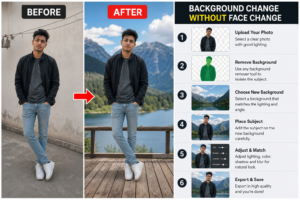
Ek Real Situation Samjho (Jo Sabke Saath Hoti Hai)
Maan lo aapne ek photo click ki:
- Face perfect
- Expression natural
- Lighting decent
Lekin background boring hai — simple wall ya room.
Aap sochte ho:
“Chalo isko beach ya office background me convert karte hain”
Phir aap AI tool me jaake prompt likhte ho:
change background to beach
Result aata hai…
- Face thoda different
- Hair style thoda change
- skin tone shift
- kabhi to banda hi alag lagta hai
Yahi main problem hai.
Face Change Kyu Ho Jata Hai? (Real Reason)
Ye samajhna bahut important hai.
1. AI Full Image Ko Re-Generate Karta Hai
Jab aap simple prompt dete ho, AI sirf background replace nahi karta…
Wo poori image ko dobara generate karta hai.
Isliye:
face details re-create hoti hain
expression change ho sakta hai
identity shift ho sakti hai
2. Subject Lock Nahi Hota
Agar aap tool ko clearly nahi batate ki:
“Face same rehna chahiye”
To AI apne hisaab se modify karta hai.
3. Masking Use Nahi Karna
Beginners direct edit karte hain.
Pro log:
Masking / selection use karte hain
Ye sabse important difference hai.
4. Prompt Weak Hota Hai
Agar prompt vague hai:
change background
To AI confuse ho jata hai.
Basic vs Smart Approach (Game Yahi Change Hota Hai)
Basic Approach (Jo Fail Hota Hai)
- direct prompt
- no masking
- no detail
- one click edit
Result:
face change ho jata hai
Smart Approach (Jo Pro Use Karte Hain)
- subject isolate
- background separate treat
- strong prompt
- minimal face interference
Result:
realistic edit + face same
Golden Rule (Yaad Rakhna)
Face ko protect karo, background ko change karo
Step-by-Step Method (Beginner Friendly)
Ab main simple tareeke se samjhata hoon.
Step 1: Image Select Karo (Correct Photo Important Hai)
Best results ke liye:
- face clear ho
- lighting normal ho
- blur kam ho
- background simple ho
Complex background me error zyada hota hai.
Step 2: Subject Select / Mask Karo
Yaha game change hota hai.
Aapko:
sirf background edit karna hai
face untouched rehna chahiye
Tools me option hota hai:
- remove background
- select subject
- auto mask
Step 3: Background Remove Karo
Subject ko isolate karo.
Ab aapke paas:
transparent background + original face
Step 4: Naya Background Add Karo
Ab aap:
- beach
- office
- studio
- city
- cafe
Jo bhi chaho add kar sakte ho.
Step 5: Lighting Match Karo
Sabse important step.
Agar:
- face warm light me hai
- background cool light me hai
image fake lagegi.
Step 6: Final Adjustments
- shadow add karo
- blur adjust karo
- color balance karo
Real Example (Samajhne Ke Liye)
Original:
Normal room photo
Final:
Same face + beach background
Difference:
Face same, environment change
Tools Jo Use Kar Sakte Ho
Beginners:
- mobile editing apps
- simple AI tools
Advanced:
- background remover tools
- layer-based editing tools
Common Mistakes (Jo Aap Avoid Karna)
Direct prompt use karna
Face ko isolate na karna
Lighting ignore karna
Low quality image use karna
Over edit karna
Part 2: Advanced Techniques + Realistic Blending Secrets
Ab tak aap basic workflow samajh chuke ho — subject isolate karo, background change karo, lighting match karo. Lekin sach yeh hai ki sirf itna karne se bhi kabhi-kabhi image thodi “fake” lagti hai.
Yahan se real game start hota hai — advanced techniques jo beginners skip kar dete hain, lekin pro editors hamesha use karte hain.
Agar aap chahte ho ki image dekhkar koi bole:
“Ye edited nahi lag raha, real photo hai”
to ye part dhyan se samajhna.
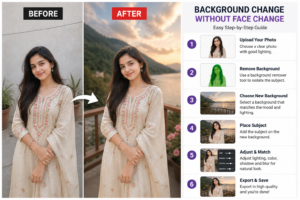
Secret #1: Face Locking Mindset (Sabse Important)
Aapko editing karte waqt ek rule follow karna hai:
Face ko kabhi touch nahi karna
Matlab:
- face par filters avoid karo
- skin tone auto adjust mat karo
- AI enhance blindly mat use karo
Kyunki ek baar face change ho gaya to:
identity loss ho jata hai
Secret #2: Background Selection Smart Rakho
Bahut log galti kya karte hain:
random background choose kar lete hain
Example:
- indoor photo + outdoor sunset background
- office dress + beach background
mismatch feel aata hai
Smart Selection Rule
Background choose karte waqt check karo:
- lighting match ho
- angle similar ho
- perspective natural ho
- mood same ho
Example
Original:
indoor yellow light
Best background:
warm tone cafe / office
Worst background:
blue cold mountain scene
Secret #3: Perspective Matching (Pro Level Trick)
Ye wo cheez hai jo 90% log ignore karte hain.
Kya hota hai?
Agar camera angle:
- front face hai
- eye-level shot hai
To background bhi:
same angle ka hona chahiye
Galat Example
Face: straight
Background: top angle city
mismatch instantly visible
Sahi Example
Face: eye-level
Background: eye-level street / room
Secret #4: Depth of Field (Blur Game)
Real photos me background thoda blur hota hai.
Agar aap:
ultra sharp background use karte ho
To image fake lagti hai.
Kya Karna Hai?
- thoda blur add karo
- subject sharp rakho
- background soft rakho
Result
natural DSLR look
Secret #5: Shadow Add Karna (Game Changer)
Agar shadow nahi hai, to subject hawa me float karta hua lagta hai.
Simple Trick
- subject ke niche light shadow add karo
- direction light ke hisaab se rakho
Example
Sunlight left side se aa rahi hai:
shadow right side me hogi
Secret #6: Color Grading Match Karo
Face aur background ke colors match hone chahiye.
Check List
- temperature same?
- brightness same?
- contrast similar?
Quick Fix
- warm/cool adjust
- saturation balance
- exposure match
Secret #7: Edges Clean Rakho
Sabse obvious mistake:
cut-out edges visible hote hain
Fix
- feather edges
- smooth selection
- hair edges soft rakho
Real Workflow (Pro System)
Agar aap perfect result chahte ho, ye steps follow karo:
- Image select
- Subject isolate
- Background choose (match angle + light)
- Background blur adjust
- Shadow add
- Color match
- Final polish
AI Prompt Tricks (Face Safe Rakhne Ke Liye)
Agar aap AI tool use kar rahe ho:
Use Keywords:
- same face
- keep original face
- do not change facial features
- background only change
- preserve identity
Example Prompt:
Change background to modern office, keep original face unchanged, preserve identity, realistic lighting
Mobile vs PC Editing Difference
Mobile:
- easy
- quick
- beginners friendly
PC:
- more control
- better precision
- advanced editing
Recommendation:
Start mobile se
Pro level ke liye PC try karo
Real-Life Example
Maan lo aap freelancer ho aur client bolta hai:
“Mera LinkedIn photo professional bana do”
Aap kya karoge?
- face same rakho
- background office/studio add karo
- lighting match karo
Result:
professional profile ready
Common Mistakes (Advanced Level)
Background over sharp rakhna
Lighting mismatch
No shadow
Wrong angle
Over color grading
Pro Tip (Golden Trick)
Less editing = more realistic
Zyada edit karoge to AI look aayega.
Part 3: Real Examples, Pro Mistakes, Pros & Cons + Final System
Ab tak aap theory aur techniques samajh chuke ho. Ab sabse important part aata hai:
Real world me kaise apply karein?
Is section me main aapko practical breakdown, mistakes aur ek aisa system dunga jisse aap consistently background change without face change kar paoge.
Real-Life Example Breakdown (Step-by-Step Thinking)
Example 1: Normal Photo → Professional Office Look
Original Image:
- simple room background
- normal lighting
- casual feel
Goal:
LinkedIn style professional photo
Smart Editing Approach:
- subject isolate karo
- background: modern office ya studio wall
- lighting: soft white tone
- slight shadow add
- contrast thoda increase
Result:
Face bilkul same + professional environment
Viewer ko lagega original hi photo hai
Example 2: Outdoor Casual → Travel Photo
Original:
- terrace ya gali ka photo
Goal:
beach / mountain vibe
Approach:
- same angle ka background choose karo
- sunlight direction match karo
- background thoda blur karo
- color warm rakho
Result:
realistic travel photo feel
Example 3: Instagram Creator Setup
Original:
- simple selfie
Goal:
aesthetic cafe vibe
Steps:
- clean cafe background
- soft lighting
- pastel tones
- smooth blending
Result: Instagram-ready premium look
Biggest Pro Mistakes (Jo Log Baar-Baar Karte Hain)
Mistake 1: Face Ko Edit Kar Dena
Sabse dangerous.
identity change ho jata hai
Mistake 2: Background Random Pick Karna
Mood mismatch ho jata hai.
Mistake 3: Lighting Ignore Karna
Image fake lagti hai instantly.
Mistake 4: No Shadow
Subject floating feel karta hai.
Mistake 5: Over Sharpen / Over Edit
AI look aa jata hai.
Advanced Pro Tips (Game Changer)
Tip 1: Always Zoom Check Karo
Zoom karke check karo:
- edges clean hain?
- hair natural hai?
- face untouched hai?
Tip 2: Ek Baar Me Perfect Expect Mat Karo
2–3 attempts normal hain.
Tip 3: Simple Background > Fancy Background
Simple zyada realistic lagta hai.
Tip 4: Same Color Family Use Karo
Warm face = warm background
Cool face = cool background
Pros & Cons of Background Change Without Face Change
Pros
- identity safe rehti hai
- realistic results milte hain
- professional use ke liye best
- social media me trust badhta hai
- branding strong hoti hai
Cons
- time lag sakta hai
- practice chahiye
- beginner ke liye thoda tricky
- perfect lighting match mushkil ho sakta hai
FAQs (Most Asked Questions)
Q1: Kya AI se 100% face same reh sakta hai?
Haan, agar aap masking + correct prompt use karo.
Q2: Sabse easy method kya hai?
Background remove + new background add + blend
Q3: Mobile se possible hai?
Haan, basic se advanced tak possible hai.
Q4: Background realistic kaise banaye?
lighting + shadow + blur match karo
Q5: Kya bina editing ke possible hai?
Pure AI se mushkil hai. Thodi manual touch better hoti hai.
Q6: Kitna time lagta hai perfect result me?
Practice ke baad 5–10 minutes me bhi ho sakta hai.
Q7: Beginners ke liye best tip kya hai?
Face ko kabhi touch mat karo
Final System (Save Kar Lo )
Ye 7-step formula use karo:
- Clear image select karo
- Subject isolate karo
- Matching background choose karo
- Background blur adjust karo
- Shadow add karo
- Color match karo
- Face untouched rakho
Powerful Conclusion
Sach bolu to background change karna easy hai…
Lekin face ko same rakhna hi real skill hai.
Jo banda ye skill samajh gaya:
- wo realistic edits karega
- uska content professional lagega
- log trust karenge
Aaj ke time me AI sab use kar rahe hain…
lekin jo banda natural editing karta hai, wahi alag dikhta hai.
Final Golden Line
Background change karna art hai, lekin face ko bachana skill hai.
Free vs Paid AI Tools – Kya Farak Hai? Sachchai Jo Beginners Ko Koi Nahi Batata